
Screenshots

App details
- Version
- 7.2-pro-build-0661
- Size
- 1.46 MB
- Updated
- July 8, 2024
- Requires
- Windows 11
- Language
- Spanish
- License
- Full
- Developer
- Mutex LLC.
- Category
- Windows OS
SoftPas in:
This product is also available in the following languages:
About xBaseView
Download xBaseView – Free Database Management Tool for Windows, macOS & Linux
Overview
xBaseView positions itself as a versatile, browser‑style database management utility built for administrators who juggle multiple data sources daily. Its clean, folder‑like navigation mirrors the familiarity of a file explorer, allowing users to locate and open database files with a few clicks. Once inside, the tool offers powerful filtering, search, and printing capabilities that turn tedious data‑handling tasks into streamlined workflows. What truly distinguishes xBaseView is its enhanced SQL query engine, which lets power users craft precise, complex queries even against massive tables, delivering results in seconds. Supporting an impressive 18 native database formats, the application can import data into 16 different structures and export to 14, making cross‑platform migrations a breeze. Whether you are maintaining legacy dBASE files, working with FoxPro, or handling modern SQL Server, MySQL, or SQLite databases, xBaseView serves as a single pane of glass for inspection, manipulation, and migration. Its lightweight footprint, coupled with a free licensing model, means small teams and large enterprises alike can adopt it without budget concerns while still benefitting from enterprise‑grade features. In short, xBaseView combines ease of use with depth of functionality, delivering a secure, update‑ready solution for today’s multi‑database environments.
Feature Set & Installation Guide
- Supports 18 native database formats, including dBASE, FoxPro, SQLite, MySQL, PostgreSQL, and SQL Server.
- Import capability to 16 formats and export to 14 formats for seamless data migration.
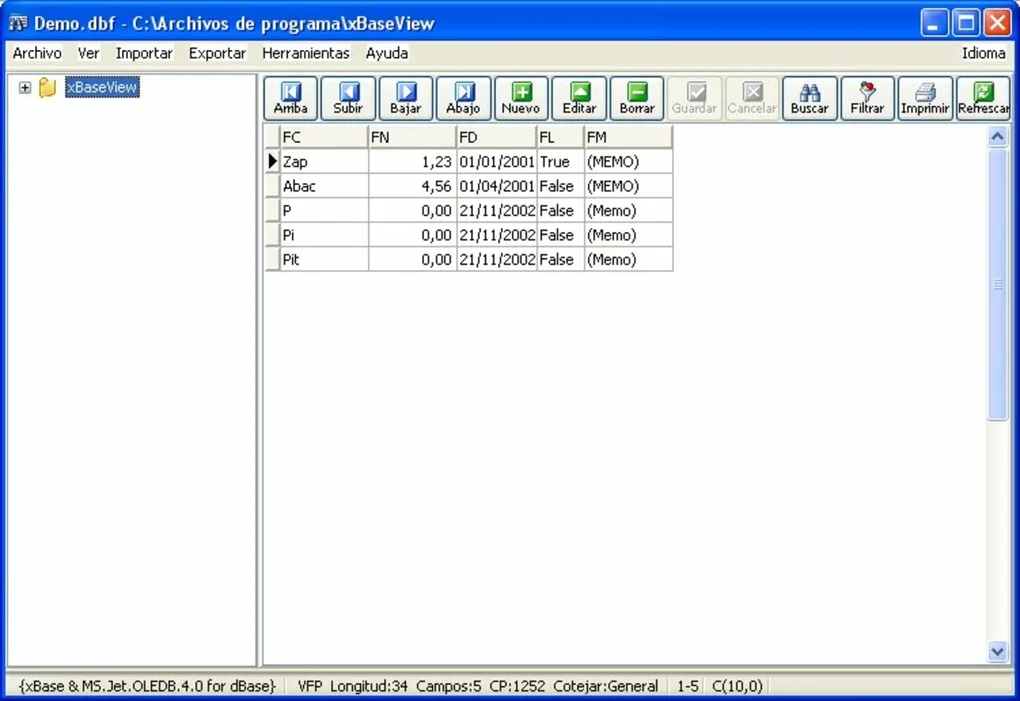
- Browser‑like folder navigation for quick file location and opening.
- Advanced filtering, full‑text search, and record printing tools.
- Enhanced SQL editor with syntax highlighting, auto‑completion, and result preview.
- Batch processing for applying updates or transformations across multiple tables.
- Secure connection handling with SSL/TLS support for remote databases.
- Automatic update checks and one‑click patch installation.
- Customizable UI themes for light or dark environments.
- Comprehensive logging and audit trail for compliance needs.
Installing xBaseView is intentionally straightforward to keep the focus on data work rather than setup hassles. After downloading the installer from the official website, run the executable on Windows, macOS, or Linux. The wizard guides you through the standard steps: accept the license agreement, choose an installation folder (the default location works for most users), and decide whether to create a desktop shortcut. On macOS, the app arrives as a .dmg file; simply drag the icon into the Applications folder. Linux users receive a .tar.gz archive; extract it and run the included “install.sh” script with root privileges. Once installed, launch xBaseView and the first‑time wizard will ask you to define default directories for database storage and set your preferred language. For remote connections, you can add new server profiles under the “Connections” menu, entering host, port, credentials, and optional SSL certificates. The program automatically checks for the latest version at startup; if an update is available, a non‑intrusive banner appears, allowing you to download and install the patch without leaving the application. This blend of intuitive installation and built‑in update management ensures that users spend more time querying data and less time wrestling with software maintenance.
Compatibility, Pros & Cons, and Frequently Asked Questions
xBaseView runs natively on the three major desktop operating systems. For Windows, the installer supports 64‑bit versions of Windows 10 and later. macOS users can run the app on macOS 11 (Big Sur) and newer, with full support for Apple Silicon via Rosetta 2 when needed. Linux distributions such as Ubuntu 20.04+, Fedora 33+, and Debian 10+ are covered, with packages provided in .deb and .rpm formats for easy integration with native package managers. The software requires at least 2 GB of RAM and 200 MB of disk space, making it suitable for older workstations as well as modern high‑performance machines.
Pros
- Extensive format support eliminates the need for multiple conversion tools.
- Free to download and use, with no hidden licensing fees.
- Intuitive UI that reduces the learning curve for new administrators.
- Robust SQL editor accelerates complex query development.
- Cross‑platform availability ensures teams can standardize tools.
Cons
- Advanced reporting features (charts, dashboards) are not included.
- Large datasets (>1 million rows) may experience slower rendering on low‑end hardware.
- No native mobile app; only desktop environments are supported.
- Limited built‑in automation compared to enterprise‑grade ETL platforms.
Frequently Asked Questions
Is xBaseView really free for commercial use?
Yes, xBaseView is released under a free‑to‑use license that permits both personal and commercial deployment without any subscription fees.
Can I connect to cloud databases such as Amazon RDS or Azure SQL?
Absolutely. xBaseView supports standard TCP/IP connections, and you can configure SSL/TLS certificates to securely access cloud‑hosted databases like Amazon RDS, Azure SQL Database, or Google Cloud SQL.
What is the recommended way to back up my databases using xBaseView?
The tool includes an “Export” wizard that lets you create full dumps in SQL, CSV, or JSON formats. Schedule regular exports via your operating system’s task scheduler to maintain up‑to‑date backups.
Does xBaseView support Unicode and multilingual data?
Yes, the application fully supports UTF‑8 encoding, allowing you to work with multilingual records, special characters, and right‑to‑left scripts without data loss.
How often are updates released and are they automatic?
The development team releases minor updates roughly every six weeks and major releases twice a year. xBaseView checks for updates at startup and offers a one‑click install, keeping your installation current without manual downloads.
Conclusion & Call to Action
For administrators who need a reliable, all‑in‑one solution to view, query, and migrate data across a wide spectrum of database engines, xBaseView delivers on every promise. Its free price tag, cross‑platform support, and feature‑rich interface make it a compelling alternative to costly enterprise suites. While it lacks deep analytics and built‑in automation pipelines, the core functionalities—especially the powerful SQL editor and extensive import/export matrix—cover the majority of day‑to‑day database management scenarios. If you’re looking to reduce tool sprawl, simplify data migrations, or simply gain a faster way to browse legacy tables, downloading xBaseView today will give you a secure, up‑to‑date companion for any data‑centric workflow. Click the button below to start your free download, install in minutes, and experience a smoother database administration experience.
Guides & Tutorials
How to install xBaseView
- Click the Download button above.
- Once redirected, accept the terms and click Install.
- Wait for the xBaseView download to finish on your device.
How to use xBaseView
This software is primarily used for its core features described above. Open the app after installation to explore its capabilities.
User Reviews
No reviews yet. Be the first to share your experience.
You may also like
more
Llama 2
Free-to-use large language model As the new addition to Meta’s arsenal of langua...

NotebookLM
Revolutionizing the note-taking and idea-generation process NotebookLM is an exp...

Github co pilot
AI-inspired software development and coding platform GitHub Copilot is a browser...

Google Gemma
Google’s lightweight AI models Introducing Google Gemma , a family of cutting-ed...

AI Image Enlarger
A free app for Windows, by ai-image-larger. AI Image Enlarger is a free software...

DALL E
AI-driven text-to-image transformation engine DALL·E is a free graphic and desig...